
Getting Started
Welcome to PubSub MFE! This guide will help you get up and running quickly.
What is PubSub MFE?
PubSub MFE is a production-grade publish/subscribe bus designed specifically for microfrontend architectures. It enables decoupled communication between different parts of your application using a familiar event-driven pattern.
Key Features
- ✅ Zero Dependencies - No external libraries, fully tree-shakable
- ✅ MQTT-style Wildcards - Flexible topic patterns (
+and#) - ✅ Handler Isolation - Errors in one subscriber don't affect others
- ✅ Cross-Tab Support - Sync messages across browser tabs/windows
- ✅ History & Replay - Catch up on past events with IndexedDB storage
- ✅ TypeScript-First - Full type safety and excellent IDE support
Installation
npm install @belyas/pubsub-mfepnpm add @belyas/pubsub-mfeyarn add @belyas/pubsub-mfeYour First PubSub App
Let's create a simple shopping cart example:
import { createPubSub } from '@belyas/pubsub-mfe';

// 1. Create a bus instance
const bus = createPubSub({
  app: 'my-shop'
});

// 2. Subscribe to cart events
bus.subscribe('cart.item.add', (msg) => {
  console.log('Item added:', msg.payload);
  // Output: Item added: { sku: 'ABC123', qty: 1 }
});

// 3. Publish a message
bus.publish('cart.item.add', {
  sku: 'ABC123',
  qty: 1
});
That's it! You've just created your first pub/sub application.
Understanding Messages
Every message in PubSub MFE has a consistent structure:
export interface Message<T = unknown> {
  readonly id: MessageId;                 // Unique identifier
  readonly topic: Topic;                  // e.g., "cart.item.add"
  readonly ts: Timestamp;                 // When it was published
  readonly schemaVersion?: SchemaVersion; // Message schema version
  readonly payload: T;                    // Your data
  readonly meta?: MessageMeta;            // MessageMeta - below
}

export interface MessageMeta {
  /** Source identifier (e.g. component ID, microfrontend name) */
  readonly source?: string;
  /** Correlation ID for request-response patterns */
  readonly correlationId?: string;
  /** Custom properties */
  readonly [key: string]: unknown;
}
Topic Organization
Topics use dot notation to create hierarchies:
// Domain.Entity.Action pattern
'cart.item.add'
'cart.item.remove'
'cart.checkout.start'
'user.profile.update'
'order.payment.complete'
💡 Best Practice
Organize topics by domain → entity → action for clarity and maintainability.
Wildcard Subscriptions
Subscribe to multiple topics at once:
// Single-level wildcard (+)
// Matches: cart.item.add, cart.item.remove
// Doesn't match: cart.item.detail.view
bus.subscribe('cart.item.+', (msg) => {
  console.log('Item action:', msg.topic);
});

// Multi-level wildcard (#)
// Matches: cart.*, cart.item.*, cart.checkout.*
bus.subscribe('cart.#', (msg) => {
  console.log('Cart event:', msg.topic);
});

// Match everything
bus.subscribe('#', (msg) => {
  console.log('Global listener:', msg.topic);
});
Cleanup
Always clean up subscriptions when they're no longer needed:
// Manual cleanup
const unsubscribe = bus.subscribe('cart.#', handler);
unsubscribe(); // Remove subscription

// Automatic cleanup with AbortSignal
const controller = new AbortController();
bus.subscribe('cart.#', handler, {
  signal: controller.signal
});

// Later...
controller.abort(); // Removes all subscriptions with this signal
React Integration
Use with React hooks:
import { useEffect } from 'react';
import { createPubSub } from '@belyas/pubsub-mfe';

const bus = createPubSub({ app: 'my-app' });

function CartNotification() {
  useEffect(() => {
    const controller = new AbortController();

    bus.subscribe('cart.#', (msg) => {
      console.log('Cart event:', msg);
    }, {
      signal: controller.signal
    });

    // Cleanup on unmount
    return () => controller.abort();
  }, []);

  return <div>Cart notifications active</div>;
}
Vue Integration
Use with Vue composables:
<script setup>
import { onMounted, onUnmounted } from 'vue';
import { createPubSub } from '@belyas/pubsub-mfe';

const bus = createPubSub({ app: 'my-app' });
const controller = new AbortController();

onMounted(() => {
  bus.subscribe('cart.#', (msg) => {
    console.log('Cart event:', msg);
  }, {
    signal: controller.signal
  });
});

onUnmounted(() => {
  controller.abort();
});
</script>

<template>
  <div>Cart notifications active</div>
</template>
Common Patterns
Event Broadcasting
// Analytics microfrontend listens to everything
bus.subscribe('#', (msg) => {
  sendToAnalytics(msg.topic, msg.payload);
});
State Synchronization
// Keep cart count in sync across components
bus.subscribe('cart.item.+', () => {
  const count = getCartItemCount();
  updateBadge(count);
});
Command Pattern
// One component commands, another responds
bus.subscribe('modal.open', (msg) => {
  openModal(msg.payload.modalId);
});

// Somewhere else...
bus.publish('modal.open', { modalId: 'checkout' });
Visual Flow
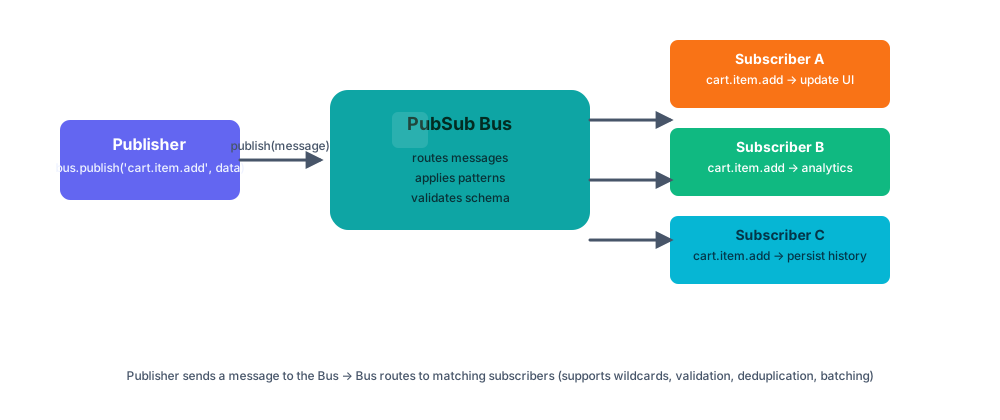
Message flow: Publisher → Bus → Subscribers
Next Steps
Now that you understand the basics, explore more features:
- Core Concepts - Dive deeper into the architecture
- Topic Patterns - Master wildcard matching
- Cross-Tab Communication - Sync across browser tabs
- API Reference - Complete API documentation
🎯 Ready for Production?
Check out the Best Practices guide for production deployment tips.