
Cross-Tab Communication
The Cross-Tab adapter enables seamless message synchronization across multiple browser tabs and windows. Perfect for keeping UI state consistent across your application instances.
Overview
When a user opens your application in multiple tabs, the Cross-Tab adapter ensures they all stay synchronized by relaying messages between tabs using browser APIs.
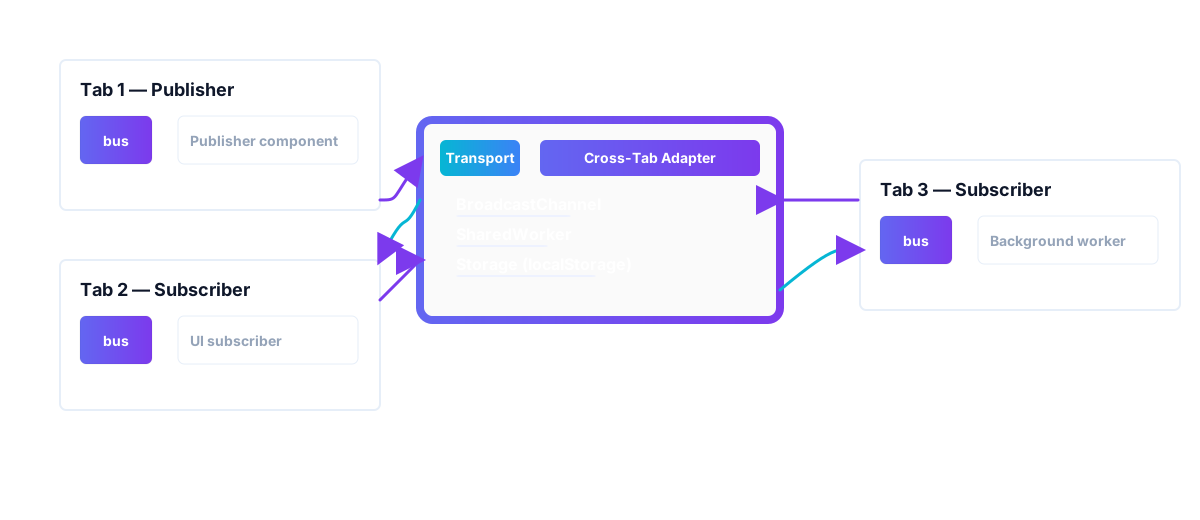
Cross-tab communication flow
Quick Start
import { createPubSub } from '@belyas/pubsub-mfe';
import {
  createCrossTabAdapter,
  BroadcastChannelTransport
} from '@belyas/pubsub-mfe/adapters/cross-tab';

// Create bus
const bus = createPubSub({ app: 'my-app' });
// Create a transport
const transport = new BroadcastChannelTransport({
  channelName: 'my-app-sync',
});
// Attach cross-tab adapter
const crossTab = createCrossTabAdapter({
  channelName: 'my-app-sync',
  transport,
});

crossTab.attach(bus);

// Now messages are automatically synced across tabs!
bus.publish('cart.item.add', { sku: 'ABC123' });
// ☝️ This message appears in ALL open tabs
Transport Options
The Cross-Tab adapter supports multiple transport mechanisms with automatic fallback:
1. BroadcastChannel
Best performance, modern browser support:
import {
  createBroadcastChannelTransport
} from '@belyas/pubsub-mfe/adapters/cross-tab/transports/broadcast-channel';

const crossTab = createCrossTabAdapter({
  channelName: 'my-app',
  transport: createBroadcastChannelTransport({
    channelName: 'my-app'
  })
});
Pros:
- ✅ Fastest performance
- ✅ Native browser API
- ✅ Low latency
- ✅ No storage overhead
Cons:
- ❌ Same-origin only
- ❌ Tabs must be open simultaneously
Browser Support: Chrome 54+, Firefox 38+, Edge 79+, Safari 15.4+
2. SharedWorker
Centralized broker pattern:
import {
  createSharedWorkerTransport
} from '@belyas/pubsub-mfe/adapters/cross-tab/transports/shared-worker';

const crossTab = createCrossTabAdapter({
  channelName: 'my-app',
  transport: createSharedWorkerTransport({
    channelName: 'my-app',
    workerUrl: new URL(
      './node_modules/@belyas/pubsub-mfe/dist/workers/cross-tab-shared-worker-broker.js',
      import.meta.url
    ).href
  })
});
Pros:
- ✅ Centralized message broker
- ✅ Connection management
- ✅ Heartbeat/reconnection
- ✅ Better for many tabs
Cons:
- ❌ Requires worker file
- ❌ More complex setup
- ❌ Limited browser support
Browser Support: Chrome 4+, Firefox 29+, Edge 79+, Safari 16+ (with limitations)
3. localStorage/Storage Events
Maximum compatibility fallback:
import {
  createStorageTransport
} from '@belyas/pubsub-mfe/adapters/cross-tab/transports/storage';

const crossTab = createCrossTabAdapter({
  channelName: 'my-app',
  transport: createStorageTransport({
    channelName: 'my-app',
    ttlMs: 30 * 1000, // Message TTL
    maxMessages: 100 // Storage limit
  })
});
Pros:
- ✅ Universal browser support
- ✅ Persistent messages
- ✅ Works across sessions
- ✅ Simple setup
Cons:
- ❌ Slower than other transports
- ❌ Storage quota limits
- ❌ Requires cleanup (GC)
Browser Support: All modern browsers with localStorage
4. Auto-Select (Recommended)
Smart fallback with best available transport:
import {
  createAutoTransport
} from '@belyas/pubsub-mfe/adapters/cross-tab/transports/auto';

const crossTab = createCrossTabAdapter({
  channelName: 'my-app',
  transport: createAutoTransport({
    channelName: 'my-app',
    // Optional: prefer specific transport
    preferredMode: 'broadcast-channel',
    // Optional: SharedWorker config
    sharedWorkerUrl: './node_modules/@belyas/pubsub-mfe/dist/workers/cross-tab-shared-worker-broker.js',
    // Callback when fallback occurs
    onFallback: (from, to, reason) => {
      console.log(`Fallback: ${from} → ${to}`, reason);
    }
  })
});
Fallback Order:
- SharedWorker (if workerUrl provided)
- BroadcastChannel
- Storage (localStorage)
Transport Comparison
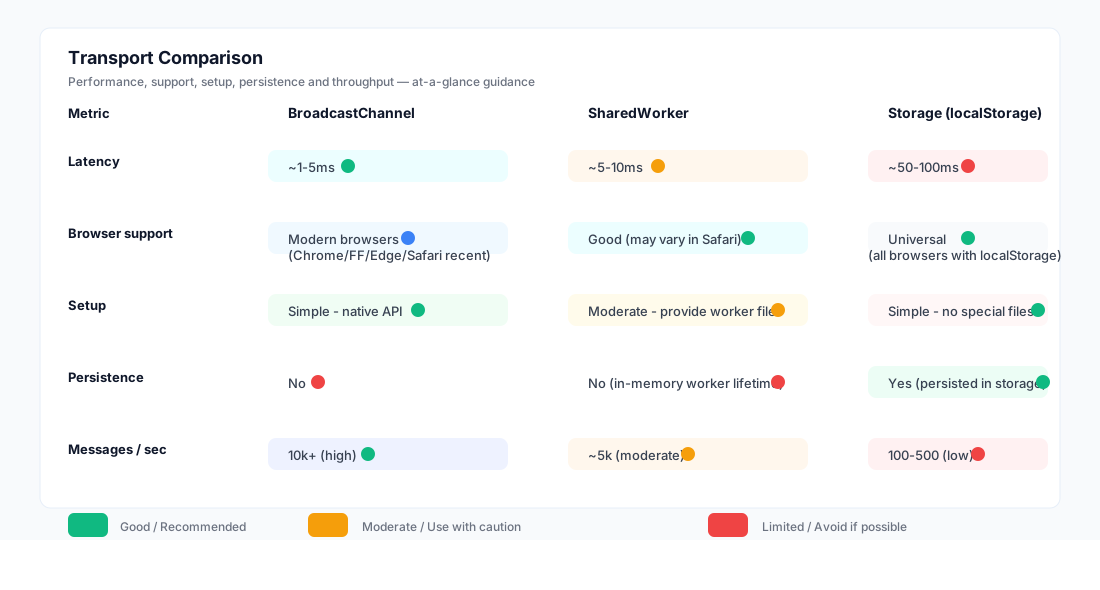
Transport feature comparison
Configuration Options
Channel Name
Unique identifier for the communication channel:
const crossTab = createCrossTabAdapter({
  channelName: 'my-app-v1' // Use versioning for breaking changes
});
💡 Channel Isolation
Different channel names are completely isolated. Use separate channels for:
- Different app versions
- Development vs production
- Separate tenants/workspaces
Batching
Optimize performance by batching multiple messages:
const crossTab = createCrossTabAdapter({
  channelName: 'my-app',
  maxBatchSize: 100,    // Max messages per batch
  batchIntervalMs: 50   // Max wait time
});
Benefits:
- Reduces overhead for high-frequency publishing
- Better performance with many small messages
- Configurable trade-off between latency and throughput
Deduplication
Prevent duplicate message delivery:
const crossTab = createCrossTabAdapter({
  channelName: 'my-app',
  dedupeWindowMs: 5000,   // Dedup window
  dedupeCacheSize: 1000,  // Message cache size
});
Rate Limiting
Control the sent messages and its frequency:
const crossTab = createCrossTabAdapter({
  channelName: 'my-app',
  rateLimit: {
    maxPerSecond: 10, // Maximum messages per second from other tabs.
    maxBurst: 200,    // Maximum burst size (token bucket capacity).
  }
});
Usage Examples
Shopping Cart Sync
Keep cart items synchronized across tabs:
// Tab 1: Add item to cart
bus.publish('cart.item.add', {
  sku: 'ABC123',
  name: 'Widget',
  price: 29.99,
  qty: 1
});

// Tab 2: Automatically updates
bus.subscribe('cart.item.add', (msg) => {
  const { sku, name, price, qty } = msg.payload;
  updateCartUI({ sku, name, price, qty });
  showNotification(`${name} added to cart`);
});
User Authentication Sync
Log out user from all tabs:
// Tab 1: User logs out
bus.publish('user.logout', {
  userId: '12345',
  timestamp: Date.now()
});

// All tabs: Handle logout
bus.subscribe('user.logout', (msg) => {
  clearLocalStorage();
  redirectToLogin();
});
Real-time Notifications
Show notifications across all tabs:
// Tab 1: New order received
bus.publish('notification.order.new', {
  orderId: 'ORD-001',
  total: 149.99,
  customer: 'John Doe'
});

// All tabs: Show notification
bus.subscribe('notification.#', (msg) => {
  showToast({
    title: 'New Order',
    message: `Order ${msg.payload.orderId} received`,
    type: 'success'
  });
});
Theme Sync
Synchronize dark/light mode:
// Tab 1: User toggles theme
bus.publish('ui.theme.change', {
  theme: 'dark'
});

// All tabs: Apply theme
bus.subscribe('ui.theme.change', (msg) => {
  document.documentElement.setAttribute('data-theme', msg.payload.theme);
  localStorage.setItem('theme', msg.payload.theme);
});
Lifecycle Management
Attach/Detach
const crossTab = createCrossTabAdapter(config);

// Attach to bus
crossTab.attach(bus);

// Later: detach
crossTab.detach();
Error Handling
const crossTab = createCrossTabAdapter({
  channelName: 'my-app',
  onError: (error) => {
    console.error('Cross-tab error:', error);
    // Send to error tracking
    Sentry.captureException(error);
  }
});
Fallback Handling
import {
  createAutoTransport
} from '@belyas/pubsub-mfe/adapters/cross-tab/transports/auto';

const transport = createAutoTransport({
  channelName: 'my-app',
  onFallback: (from, to, reason) => {
    console.warn(`Transport fallback: ${from} → ${to}`);
    console.log('Reason:', reason);

    // Track in analytics
    analytics.track('transport_fallback', { from, to, reason });
  }
});
Performance Optimization
Message Throttling
Prevent overwhelming tabs with high-frequency updates:
import { throttle } from 'lodash-es';

const throttledHandler = throttle((msg) => {
  updateUI(msg.payload);
}, 100); // Max once per 100ms

bus.subscribe('realtime.price.#', throttledHandler);
Lazy Attachment
Only attach cross-tab when needed:
let crossTab: CrossTabAdapter | null = null;

function enableCrossTabSync() {
  if (!crossTab) {
    crossTab = createCrossTabAdapter(config);
    crossTab.attach(bus);
  }
}

// Later, when user enables sync feature
enableCrossTabSync();
Debugging
Enable Debug Logging
const crossTab = createCrossTabAdapter({
  channelName: 'my-app',
  debug: true // Enables console logging
});
Monitor Message Flow
bus.subscribe('#', (msg) => {
  console.log('[CrossTab]', msg.topic, msg);
}, {
  sourceFilter: {
    include: ['cross-tab-adapter'] // Only log cross-tab messages
  }
});
Transport Stats
// Get transport statistics
const stats = crossTab.getStats();

console.log('Stats:', stats);
Browser Support
| Transport | Chrome | Firefox | Safari | Edge |
|---|---|---|---|---|
| BroadcastChannel | 54+ | 38+ | 15.4+ | 79+ |
| SharedWorker | 4+ | 29+ | 16+ | 79+ |
| Storage | All | All | All | All |
🌐 Progressive Enhancement
Use Auto-transport for automatic fallback to the best available transport.
Best Practices
1. Use Auto-Transport
Let the library choose the best transport for each browser:
const transport = createAutoTransport({ channelName: 'my-app' });2. Version Your Channels
Avoid compatibility issues when deploying:
const channelName = `my-app-${APP_VERSION}`;3. Handle Offline/Online
Gracefully handle network changes:
window.addEventListener('online', () => {
  crossTab.reconnect();
});
4. Clean Up
Always detach when done:
// This is not reliable, it's just for demo's sake
window.addEventListener('beforeunload', () => {
  crossTab.detach();
});
Troubleshooting
Messages Not Syncing
- Check channel names match across all tabs
- Verify origin restrictions (same-origin policy)
- Check browser console for errors
- Enable debug mode to see message flow
High Memory Usage
- Enable deduplication to reduce cache size
- Use topic filtering to sync only necessary messages
- Implement message throttling for high-frequency updates
- Monitor storage quota (for Storage transport)
Slow Performance
- Switch to BroadcastChannel if using Storage
- Enable message batching for bulk updates
- Use topic filtering to reduce message volume
- Consider SharedWorker for many tabs
Next Steps
- History Adapter - Replay past events
- Transports Deep Dive - Technical details
- Performance Guide - Optimization tips
- Examples - Real-world patterns
⚠️ Important
Cross-tab communication only works within the same origin (protocol + domain + port). For cross-origin communication, use the Iframe Adapter.