
Core Concepts
Understanding the core concepts of PubSub MFE will help you build robust, scalable microfrontend applications.
Architecture Overview
PubSub MFE follows a hub-and-spoke architecture where the bus acts as the central hub, and microfrontends are the spokes.
┌─────────────┐      ┌─────────────┐      ┌─────────────┐
│  Cart MFE   │      │  Header MFE │      │ Product MFE │
└──────┬──────┘      └──────┬──────┘      └──────┬──────┘
       │                    │                    │
       └────────────────────┴────────────────────┘
                            │
                     ┌──────▼──────┐
                     │  PubSub Bus │
                     └──────┬──────┘
                            │
       ┌────────────────────┴────────────────────┐
       │                    │                    │
┌──────▼──────┐      ┌──────▼──────┐      ┌──────▼──────┐
│Analytics MFE│      │ Checkout MFE│      │  Auth MFE   │
└─────────────┘      └─────────────┘      └─────────────┘
Key Components
1. PubSub Bus
The central message broker that routes messages from publishers to subscribers.
import { createPubSub, type PubSubBus } from '@belyas/pubsub-mfe';

const bus: PubSubBus = createPubSub({
  app: 'my-app',  // Application identifier
  debug: false    // Enable debug logging
});
2. Publishers
Components that emit messages to the bus:
// Simple publish
bus.publish('cart.item.add', {
  sku: 'ABC123',
  qty: 1
});

// Publish with options
bus.publish('order.created', orderData, {
  source: 'checkout-service',       // Source publisher
  schemaVersion: "cart.item.add@1", // Schema version
  correlationId: 1234,              // Correlation ID for .e.g., request-response tracing
  meta?: {}                         // Extra information as needed
});
3. Subscribers
Components that listen for specific topics:
bus.subscribe('cart.item.+', (msg) => {
  console.log(`Action on cart item: ${msg.topic}`);
  console.log('Payload:', msg.payload);
});
Message Structure
Every message follows a consistent structure:
export interface Message<T = unknown> {
  readonly id: MessageId;                 // Unique identifier
  readonly topic: Topic;                  // e.g., "cart.item.add"
  readonly ts: Timestamp;                 // When it was published
  readonly schemaVersion?: SchemaVersion; // Message schema version
  readonly payload: T;                    // Your data
  readonly meta?: MessageMeta;            // MessageMeta - below
}

export interface MessageMeta {
  /** Source identifier (e.g. component ID, microfrontend name) */
  readonly source?: string;
  /** Correlation ID for request-response patterns */
  readonly correlationId?: string;
  /** Custom properties */
  readonly [key: string]: unknown;
}
Example Message
{
  id: "33003f67-1acc-4cc1-b17c-a676f744c620",
  topic: 'cart.item.add',
  payload: { sku: 'ABC123', qty: 1, price: 29.99 },
  ts: 1704067200000,
  schemaVersion: "cart.item.add@1",
  meta: {
    source: 'cart-mfe',
    correlationId: 1234
  }
}
Topic Patterns
Topics are hierarchical strings using dot notation:
Pattern Syntax
| Component | Description | Example |
|---|---|---|
| Literal | Exact match | cart.item.add |
+ | Single-level wildcard | cart.+.add |
# | Multi-level wildcard | cart.# |
Pattern Examples
// Exact match
'cart.item.add' → Matches only 'cart.item.add'

// Single-level wildcard
'cart.+.add' → Matches:
  ✅ 'cart.item.add'
  ✅ 'cart.promo.add'
  ❌ 'cart.item.detail.add' (too many levels)

// Multi-level wildcard
'cart.#' → Matches:
  ✅ 'cart.item.add'
  ✅ 'cart.checkout.start'
  ✅ 'cart.item.detail.update'
  ✅ 'cart.anything.at.any.depth'

// Match everything
'#' → Matches all topics
Pattern Matching Diagram
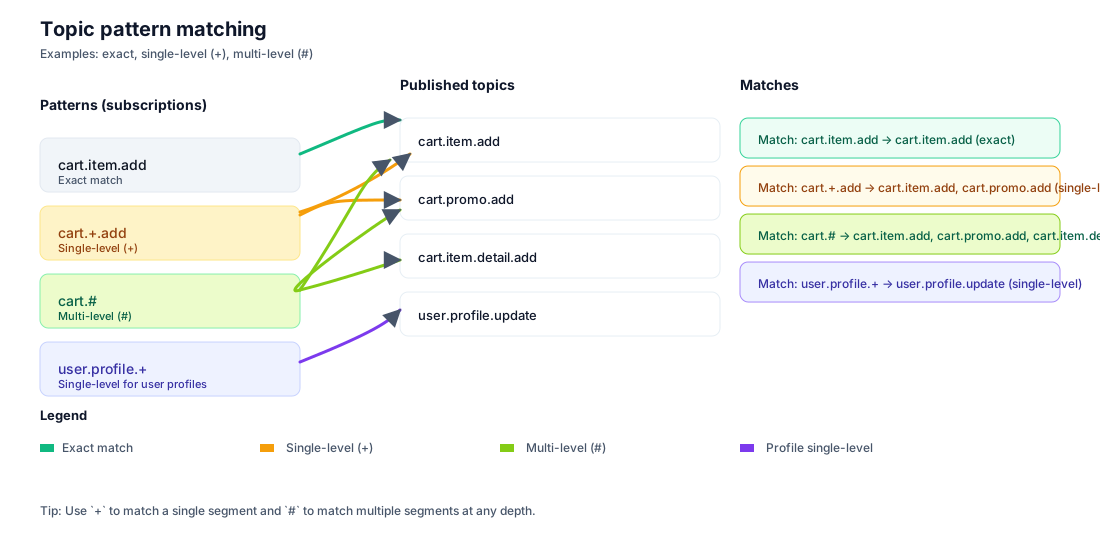
Topic pattern matching visualization
Handler Isolation (Bulkhead Pattern)
One of PubSub MFE's most important features is handler isolation. If one subscriber throws an error, it doesn't affect other subscribers.
Without Isolation
// ❌ Bad: One error breaks everything
bus.subscribe('cart.#', () => {
  throw new Error('Subscriber 1 failed');
});

bus.subscribe('cart.#', () => {
  console.log('This never runs!'); // ❌ Blocked by previous error
});
With Isolation (Built-in)
// ✅ Good: Errors are isolated
bus.subscribe('cart.#', () => {
  throw new Error('Subscriber 1 failed');
  // Error is caught and logged, doesn't propagate
});

bus.subscribe('cart.#', () => {
  console.log('This still runs!'); // ✅ Independent execution
});
Error Handling
PubSub MFE provides hooks for monitoring handler errors:
const bus = createPubSub({
  app: 'my-app',
  onDiagnostic(event: DiagnosticEvent) {
    if (event.type === "handler-error") {
      console.error(`Handler error on ${event.topic}:`, event.error);

      // Send to error tracking service
      Sentry.captureException(event.error, {
        tags: { topic: event.topic, messageId: event.messageId }
      });
    }
  }
});
Lifecycle Management
AbortSignal Support
Integrate with the AbortSignal API for automatic cleanup:
const controller = new AbortController();

// Subscribe with signal
bus.subscribe('cart.#', handler, {
  signal: controller.signal
});

// Later: cleanup all subscriptions
controller.abort();
Manual Unsubscribe
const unsubscribe = bus.subscribe('cart.#', handler);

// Later: remove this specific subscription
unsubscribe();
Component Lifecycle Integration
React
useEffect(() => {
  const controller = new AbortController();

  bus.subscribe('cart.#', handler, {
    signal: controller.signal
  });

  return () => controller.abort();
}, []);
Vue
onMounted(() => {
  const controller = new AbortController();

  bus.subscribe('cart.#', handler, { signal: controller.signal });

  onUnmounted(() => controller.abort());
});
Source Filtering
Filter messages by their origin to avoid loops or target specific sources:
Include Pattern
// Only receive messages from specific sources
bus.subscribe('cart.#', handler, {
  sourceFilter: {
    include: ['auth-mfe', 'checkout-mfe']
  }
});
Exclude Pattern
// Ignore messages from yourself
bus.subscribe('cart.#', handler, {
  sourceFilter: {
    exclude: ['cart-mfe'] // Don't receive your own messages
  }
});
Use Cases
// 1. Prevent feedback loops
bus.subscribe('sync.#', (msg) => {
  // Process external syncs, ignore your own
}, {
  sourceFilter: {
    exclude: ['my-component-id']
  }
});

// 2. Target specific services
bus.subscribe('analytics.#', (msg) => {
  // Only process analytics from trusted sources
}, {
  sourceFilter: {
    include: ['analytics-sdk', 'tracking-service']
  }
});
Message Flow Diagram
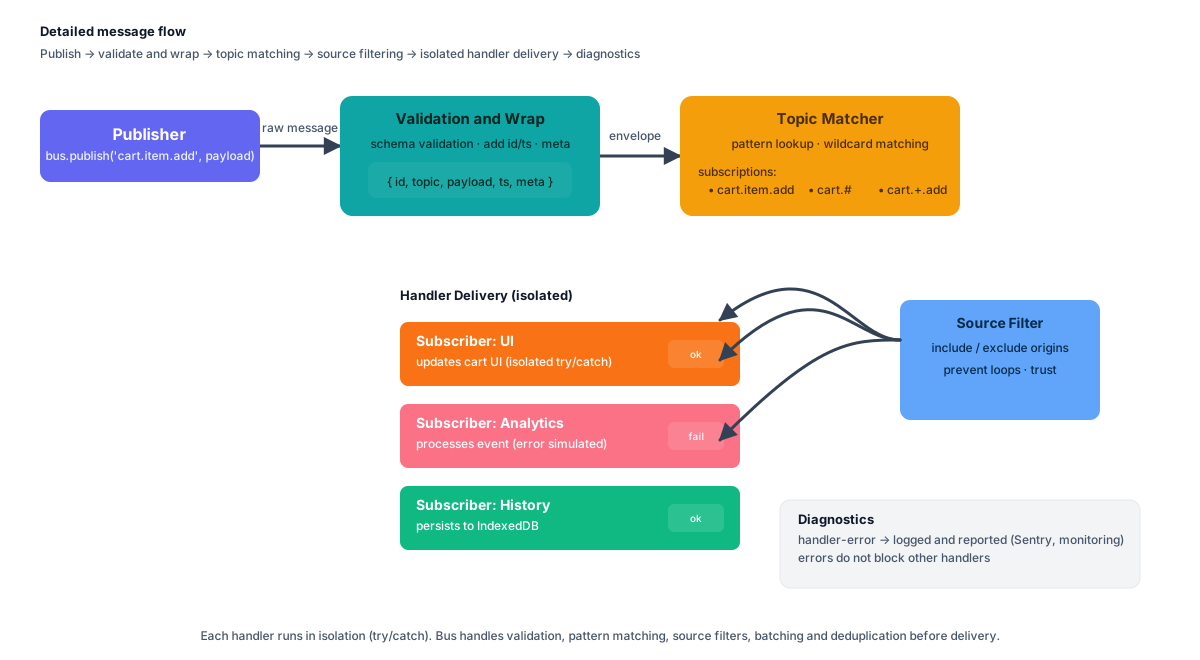
Complete message flow with filtering and isolation
Performance Characteristics
Time Complexity
- Publish: O(n) where n = number of matching subscribers
- Subscribe: O(1) registration, O(m) pattern compilation where m = pattern segments
- Unsubscribe: O(1) removal
Memory Footprint
- Core bus: ~5KB minified + gzipped
- Cross-tab adapter: ~8KB (with BroadcastChannel transport)
- History adapter: ~12KB (with IndexedDB)
See Performance Benchmarks for detailed metrics.
Best Practices
1. Use Specific Topics
// ✅ Good: Specific, clear intent
bus.publish('cart.item.add', data);
bus.publish('order.payment.success', data);

// ❌ Bad: Too generic
bus.publish('update', data);
bus.publish('event', data);
2. Organize by Domain
// ✅ Good: Domain.Entity.Action
'inventory.product.update'
'user.profile.created'
'payment.transaction.completed'

// ❌ Bad: Flat structure
'productUpdate'
'newUser'
'paymentDone'
3. Always Clean Up
// ✅ Good: Automatic cleanup
useEffect(() => {
  const controller = new AbortController();
  bus.subscribe('cart.#', handler, { signal: controller.signal });
  return () => controller.abort();
}, []);

// ❌ Bad: Memory leak
useEffect(() => {
  bus.subscribe('cart.#', handler); // Never cleaned up!
}, []);
Next Steps
- Publishing & Subscribing - Deep dive into pub/sub patterns
- Topic Patterns - Master wildcard matching
- Schema Validation - Add message contracts
- Cross-Tab Communication - Sync across tabs
🔒 Security Note
Never trust message payloads. Always validate and sanitize data, especially when using cross-tab or iframe adapters.